
Campaigns
A campaign is one broadcast as a first-class record: compose the content once, point it at a broadcast stream, and Camelmailer fans it out into one message per subscriber.
You write the subject, From address, and HTML and text bodies once, then aim the campaign at a broadcast stream. Camelmailer expands it into a message for every subscriber, and each of those messages carries the campaign's campaign_id. That tag is what lets the per-campaign stats roll up over exactly the mail this campaign produced.
Campaigns live on the Server API (X-Server-API-Key, base path /api/v2/server), the same credential you use for message streams and one-off sends. They are tenant data: row-level security scopes every read and write to the owning server, the same isolation the messages table uses.
Stream and audience
A campaign always targets one broadcast stream. Transactional streams handle one-off, per-recipient sends and cannot host a campaign; point one at a transactional stream and the API returns 422 ValidationError (campaigns can only target a broadcast stream).
The audience is the stream's opted-in subscribers, meaning the addresses with a subscribed subscription row for that stream. When the campaign sends, it walks the current subscribed addresses and skips everyone else, so an unsubscribe recorded before the send takes that recipient out of the campaign. See Broadcast streams for how subscriptions and consent work.
Fields
| Field | Type | Meaning |
|---|---|---|
id | integer | Campaign id, unique within the server. |
stream_id | integer | The broadcast stream that supplies the audience. |
stream | object | On list and detail, the audience stream's permalink and name (may be null if the stream was deleted). |
name | string | null | Internal label for the campaign. |
subject | string | null | The message subject. |
from | string | null | The From address (the broadcast path authorizes its domain and sender). |
html_body | string | null | HTML body. |
text_body | string | null | Plain-text body. |
status | string | Lifecycle state (see below). |
total | integer | Recipient count snapshotted when the send begins. |
sent | integer | Recipients expanded into messages so far. |
scheduled_at | timestamp | null | Send time for a scheduled campaign. |
created_at | timestamp | null | When the campaign row was created. |
completed_at | timestamp | null | When expansion finished (sent or failed). |
Status lifecycle
A campaign starts as a draft, an armed scheduled send, or goes straight to sending. From there it advances to a terminal state. draft and scheduled are the two planned states; edit, send-now, and cancel apply only to those. Once a campaign is sending, sent, failed, or canceled, those actions return 422 ValidationError.
| Status | Meaning | Next states |
|---|---|---|
draft | Composed and saved, not sending. Editable. | scheduled, sending, canceled |
scheduled | Armed to send at scheduled_at. Editable. | draft, sending, canceled |
sending | Expanding into per-recipient messages. | sent, failed |
sent | Expansion finished; completed_at set. | terminal |
failed | A fatal error stopped expansion; completed_at set. | terminal |
canceled | Called off before sending. | terminal |
A campaign is reached from sending to sent when the last batch finishes, and to failed when the subscriber lookup fails or a scheduled campaign has lost its stream.
Create and edit
Everything below uses the Server API key and base URL from the quickstart:
export SERVER_KEY=…              # a server API credential
export API=http://localhost:5000
Create
POST /api/v2/server/campaigns creates a server-level campaign. stream (a broadcast stream permalink) and from are required. The initial status follows the request: send_now wins, then a scheduled_at, else a draft. The response is 201 with { "campaign": { … } }.
# Save a draft: compose now, decide when to send later
curl -s -X POST "$API/api/v2/server/campaigns" \
  -H "X-Server-API-Key: $SERVER_KEY" -H "Content-Type: application/json" \
  -d '{
    "stream": "newsletter",
    "name": "July product update",
    "from": "news@acme.example",
    "subject": "What shipped in July",
    "html_body": "<h1>July</h1><p>Here is what is new.</p>",
    "text_body": "July: here is what is new."
  }'
POST /api/v2/server/streams/{permalink}/campaigns, which names the stream in the path. It always sends: the campaign is created with status sending and expanded to the stream's subscribers before the response returns, so it accepts no scheduled_at. Reach for it when the campaign is meant to go out on the spot, and use the route above for anything you want to review first.Edit
PATCH /api/v2/server/campaigns/{id} edits a draft or scheduled campaign. Send only the fields you want to change. name, subject, html_body, and text_body accept null to clear them.
curl -s -X PATCH "$API/api/v2/server/campaigns/42" \
  -H "X-Server-API-Key: $SERVER_KEY" -H "Content-Type: application/json" \
  -d '{"subject": "What shipped in July (revised)"}'
In the dashboard
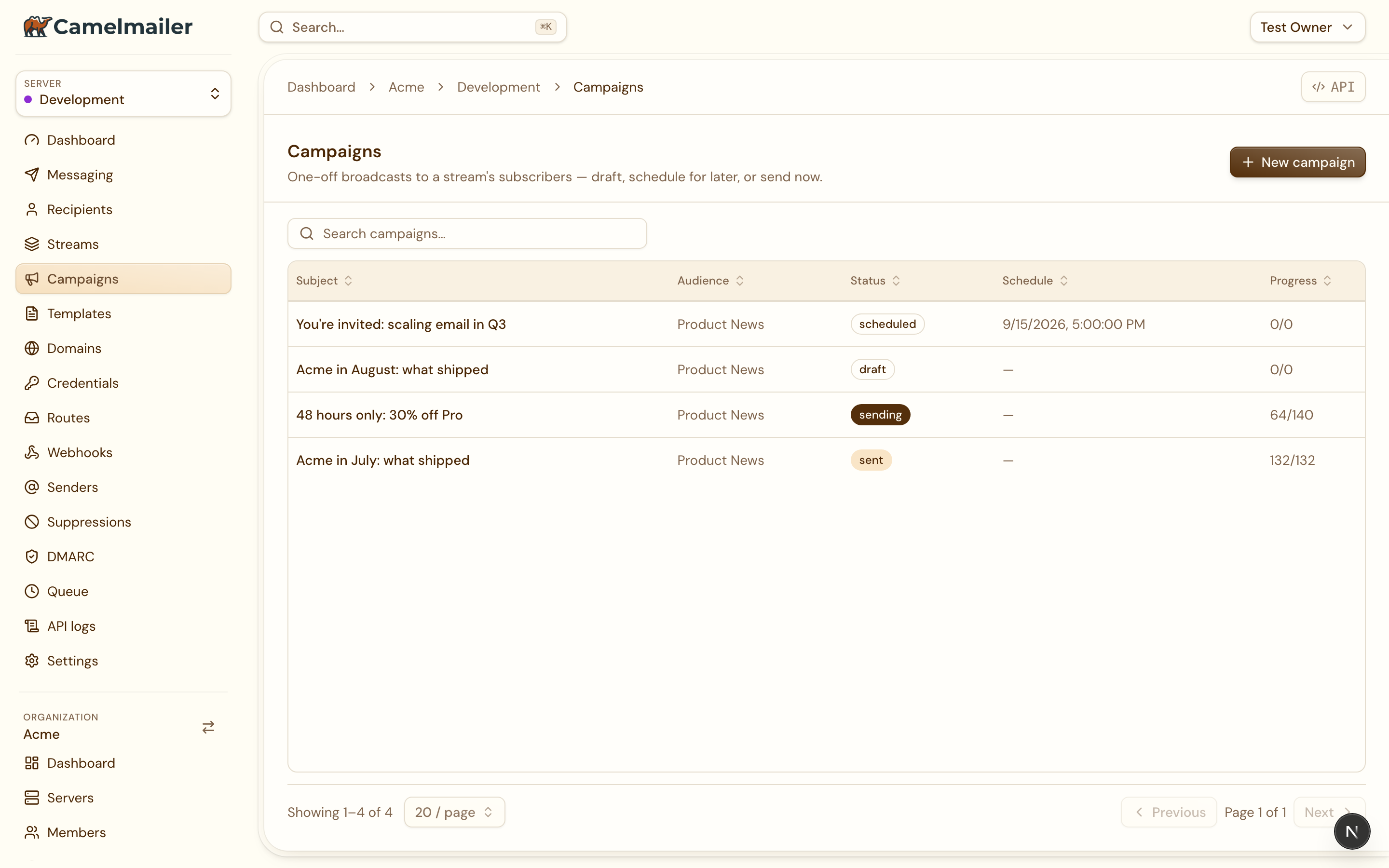
The dashboard exposes the same surface under Server → Campaigns: a list with each campaign’s audience, status, schedule and progress.
The compose form offers Send now, Schedule and Save as draft, and you write the body in the same drag-and-drop block editor the template editor uses, with the Editor, HTML and Plain Text switch and a live preview. A campaign is composed exactly like a template, then aimed at a broadcast stream.
The detail view is tabbed. A Dashboard tab shows the counter tiles and an engagement donut from the campaign’s stats, and Recipients and Messages tabs list the mail the campaign produced.
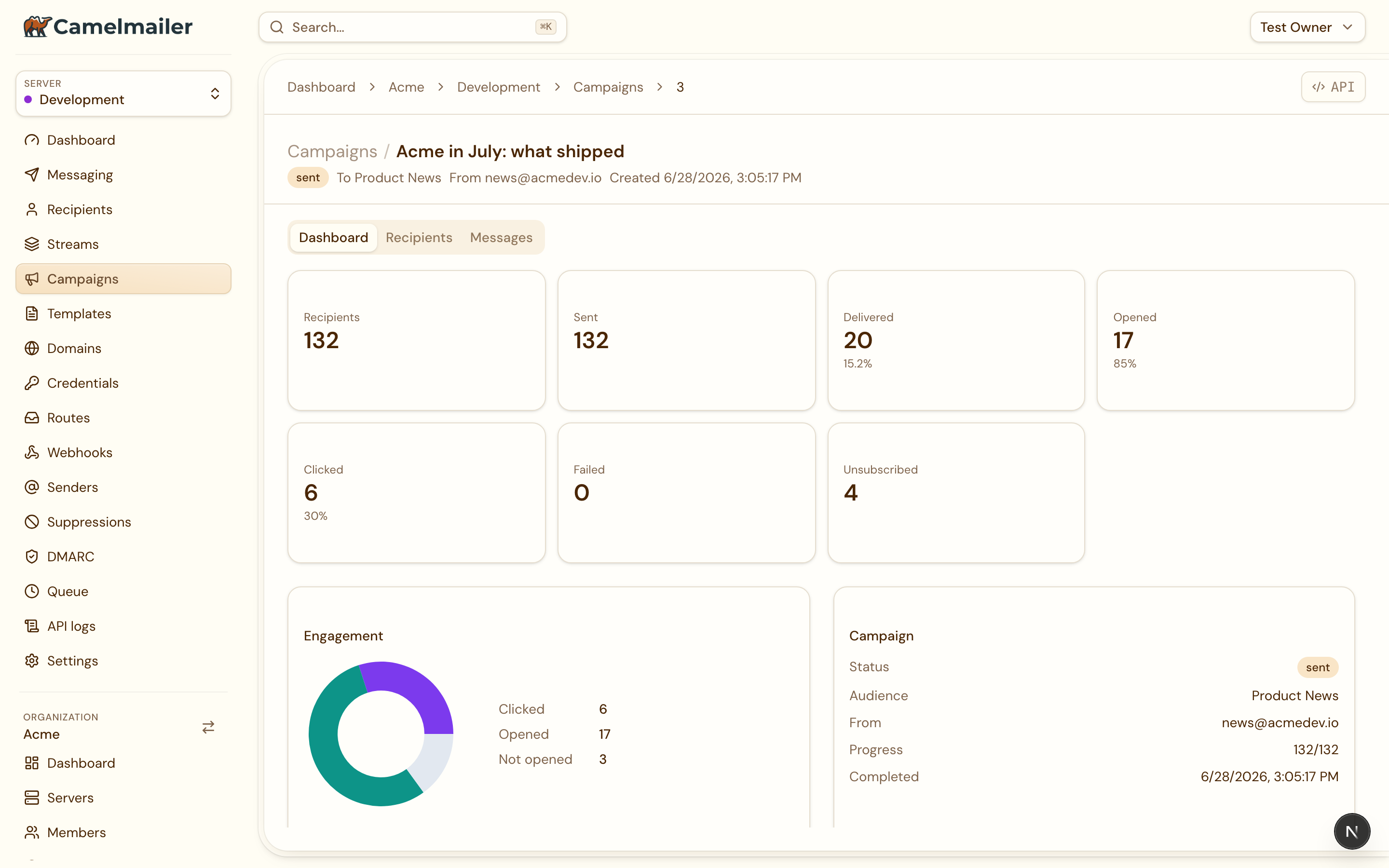
GET /api/v2/server/messages?campaign_id=<id>. Because every expanded message carries the campaign’s campaign_id, the tabs show precisely the mail this campaign sent, rather than an approximation by stream and subject.Scheduling
A campaign can send immediately or at a chosen time. Two paths flip a campaign straight to sending: create with send_now, or send an existing planned campaign now. Both re-snapshot total from the current subscriber count, set the status to sending, and start the async expansion.
# Create and send at once
curl -s -X POST "$API/api/v2/server/campaigns" \
  -H "X-Server-API-Key: $SERVER_KEY" -H "Content-Type: application/json" \
  -d '{"stream": "newsletter", "from": "news@acme.example",
       "subject": "Live now", "html_body": "<p>Hello subscribers.</p>",
       "send_now": true}'

# Or send an existing draft/scheduled campaign now
curl -s -X POST "$API/api/v2/server/campaigns/42/send" \
  -H "X-Server-API-Key: $SERVER_KEY"
For a scheduled send, give the campaign a scheduled_at (an RFC 3339 timestamp) and it enters scheduled. Setting a time on a draft moves it to scheduled; clearing the time ("scheduled_at": null) drops it back to draft.
# Schedule at create time
curl -s -X POST "$API/api/v2/server/campaigns" \
  -H "X-Server-API-Key: $SERVER_KEY" -H "Content-Type: application/json" \
  -d '{"stream": "newsletter", "from": "news@acme.example",
       "subject": "Tuesday digest", "html_body": "<p>…</p>",
       "scheduled_at": "2026-07-21T09:00:00Z"}'

# Or arm an existing draft
curl -s -X PATCH "$API/api/v2/server/campaigns/42" \
  -H "X-Server-API-Key: $SERVER_KEY" -H "Content-Type: application/json" \
  -d '{"scheduled_at": "2026-07-21T09:00:00Z"}'
An in-process scheduler turns due schedules into sends. It runs inside the web-server process and wakes every 30 seconds. On each pass it lists the servers and, per tenant, atomically claims the scheduled campaigns whose scheduled_at has passed, flipping each to sendingin the same step so two passes never double-send. It then runs the expansion for each claimed campaign. A per-server or per-campaign error is logged and the pass continues, so one bad campaign leaves the rest running. If a scheduled campaign's stream has gone missing by the time it fires, the campaign is marked failed.
Async expansion
When a campaign starts sending (send-now, or the scheduler claiming it), Camelmailer expands it into individual messages. The expansion runs in the background and returns the campaign to the caller right away, so a create-and-send responds in milliseconds while delivery proceeds behind it.
The expansion:
- lists the stream's currently
subscribedaddresses, - walks them in batches of 200, sending each through the shared broadcast send path with the campaign's From, subject, and bodies, on the campaign's stream,
- tags each stored message with the campaign's
campaign_id, - advances the campaign's
sentcounter after every batch, so a poller watching the campaign sees it move, - marks the campaign
sentand stampscompleted_atwhen the last batch is done.
Two counters track progress. total is the audience size snapshotted when the send began (the subscriber count at that moment). sent is how many recipients have been expanded into messages so far, climbing toward total.
failed.Analytics
GET /api/v2/server/campaigns/{id} returns the campaign plus a stats object aggregated over the messages the campaign produced (attributed by campaign_id) and their tracking data:
curl -s "$API/api/v2/server/campaigns/42" -H "X-Server-API-Key: $SERVER_KEY"
{
  "campaign": { "id": 42, "status": "sent", "total": 1200, "sent": 1200, "…": "…" },
  "stats": {
    "total": 1200,
    "sent": 1200,
    "delivered": 1187,
    "failed": 13,
    "opened": 640,
    "clicked": 219,
    "unsubscribed": 4
  }
}| Stat | What it counts |
|---|---|
total | Audience snapshot from the campaign row. |
sent | Recipients expanded into messages so far. |
delivered | Attributed messages with status Sent that are not held. |
failed | Attributed messages that bounced or hard-failed. |
opened | Distinct attributed messages with at least one open. |
clicked | Distinct attributed messages with at least one link click. |
unsubscribed | Stream-scoped unsubscribe/complaint suppressions created at or after the campaign's created_at. |
opened and clickedcome from Camelmailer's open and click tracking, so they populate for streams and messages where tracking is enabled. See Tracking for how opens and clicks are recorded, and Suppressions for how unsubscribes and complaints feed the unsubscribedfigure. Because every expanded message carries the campaign's tag, you can also inspect the individual messages through the normal message endpoints, and campaign volume shows up in the server-wide aggregate at GET /api/v2/server/stats.
Cancel a campaign
POST /api/v2/server/campaigns/{id}/cancel calls off a draft or scheduled campaign and sets its status to canceled:
curl -s -X POST "$API/api/v2/server/campaigns/42/cancel" \
  -H "X-Server-API-Key: $SERVER_KEY"
Cancel is a planned-state action. A campaign that is already sending, sent, failed, or canceled returns 422 ValidationError. To keep a scheduled campaign from firing, cancel it (or clear its scheduled_at to return it to a draft) before its time arrives.
A note on local development
The scheduler runs only in the web-server process. Boot the full stack (docker compose up) and the web server carries it, so scheduled campaigns fire on their own. Run pieces by hand and a scheduled campaign stays scheduled until a web-server is up to claim it.
Expansion queues messages; delivery is a separate step. Each expanded message goes through the same send path as any other broadcast, which enqueues it for the delivery worker. Without a running worker, the expanded messages sit in the queue and the campaign still reaches sent (its sent counter reflects messages enqueued, not messages delivered), yet nothing leaves the building until a worker drains the queue. For an end-to-end local test, run the worker alongside the web server:
./target/release/camelmailer web-server &   # HTTP API + campaign scheduler
./target/release/camelmailer worker &       # delivers the expanded messages
Quick reference
| Method | Path | Purpose |
|---|---|---|
GET | /api/v2/server/campaigns | List every campaign of the server. |
POST | /api/v2/server/campaigns | Create a campaign (draft, scheduled, or send_now). |
GET | /api/v2/server/campaigns/{id} | Fetch one campaign with its stats. |
PATCH | /api/v2/server/campaigns/{id} | Edit a draft/scheduled campaign. |
POST | /api/v2/server/campaigns/{id}/send | Send a draft/scheduled campaign now. |
POST | /api/v2/server/campaigns/{id}/cancel | Cancel a draft/scheduled campaign. |
Related: Broadcast streams · Message streams · Tracking · Suppressions