
Sending domains
Before a server may send as you@acme.com, Camelmailer needs proof you control the domain and the DNS in place so receivers trust the mail. A sending domain ties those together: you add the domain, publish the records Camelmailer hands you, verify ownership, and from then on mail from that domain is DKIM-signed and passes SPF.
What adding a domain does
Adding a domain runs two steps server-side before you touch DNS. It generates a dedicated RSA-2048 DKIM keyfor the domain (a PKCS#8 private key, kept in the domain's dkim_private_key and never returned by the API), and a stable verification token that you publish later as a TXT record to prove ownership.
The response then carries the domain plus the three records to publish. The SPF mechanism and the DKIM selector come from your installation's dns config group, so the exact name and value you get reflect your setup. The DKIM record is null in the rare case where neither the domain nor the installation holds a signing key.
The DNS records to publish
All three are TXT records. Publish them at your DNS provider, wait for propagation, then verify.
| Record | Type | Value | Purpose |
|---|---|---|---|
_camelmailer-challenge.acme.com | TXT | camelmailer-verification=<token> | Proves you control the domain |
acme.com | TXT | v=spf1 include:spf.example.com ~all | Authorizes this installation to send for the domain |
camelmailer._domainkey.acme.com | TXT | v=DKIM1; k=rsa; p=<base64 public key> | Lets receivers verify the DKIM signature |
Two records Camelmailer leaves to you on purpose. You publish _dmarc.acme.com yourself once SPF and DKIM pass; the policy journey and the rua= reporting address are covered in Deliverability & DNS. Bounces arrive on the installation's shared return-path domain, so a per-domain return-path record is optional (see Return-Path and bounces).
DKIM signing
Every domain added through the current API carries its own DKIM key, so a leaked or rotated key on one domain leaves the others untouched. The p=value is the base64 SubjectPublicKeyInfo of the domain's key, derived on the fly each time the record is rendered, so the value in the API and dashboard is always the current key. The record name uses the selector from dns.dkim_identifier (default postal; set it to camelmailer and the record becomes camelmailer._domainkey.acme.com).
Signing happens at delivery time in the worker, once the final body is assembled after the click-tracking rewrites and the open pixel, so the signature covers exactly what the recipient receives. The stored copy of the message stays unsigned. Key selection follows one rule:
- If the domain has its own
dkim_private_key, that key signs. - Otherwise the installation key signs (the public half of
camelmailer.signing_key_path). This fallback covers domains created before per-domain keys existed, and it stays valid. - If a per-domain key is present but fails to parse, the worker logs a warning and falls back to the installation key, so a bad key still leaves mail signed.
The selector is the same in every case, which is why the health check compares the published p=against exactly the key this server would sign with. When neither a domain key nor an installation key exists, outgoing mail goes out unsigned and the dashboard shows a "No DKIM key" notice. A message is only signed when it carries an authenticated domain, so mail authorized by a confirmed single sender address alone has no domain to attach and goes out unsigned on that count. The signature itself is RFC 6376 rsa-sha256, relaxed/relaxed canonicalization, over the From, Sender, Reply-To, To, Cc, Subject, Date and Message-ID headers that are present.
Verify ownership
A domain starts verified: false. Verification resolves the TXT records at _camelmailer-challenge.acme.com and marks the domain verified when one of them equals your challenge value:
curl -X POST \
  -H "X-Admin-API-Key: $ADMIN_KEY" \
  https://mail.example.com/api/v2/admin/organizations/acme/servers/transactional/domains/acme.com/verify
When the record is missing or the lookup fails, the call returns 422 ValidationError whose message names the exact record to publish, so you can copy it straight from the error. Operators driving the API with the X-Admin-API-Key machine key have an escape hatch: sending {"force": true} marks the domain verified and skips the DNS check. That is limited to the machine key; a user session sending force gets 403 Forbidden.
Verification is what unlocks sending. On every send the From domain must match a verified sending domain of the server or its org, or the exact From address must be a confirmed sender address. Only a verified domain attaches a domain id to the message, which is in turn what triggers DKIM signing. See Sending mail for the send path itself.
SPF
The SPF record authorizes this installation's sending infrastructure for your domain. Camelmailer builds the expected value from config: with dns.spf_include set (the usual case) the mechanism is include:<dns.spf_include>, for example v=spf1 include:spf.example.com ~all. With it empty, the value falls back to the installation's SMTP hostname: v=spf1 a:<camelmailer.smtp_hostname> ~all.
Publish exactly one v=spf1 record on the domain and keep the qualifier at ~all (softfail) or -all(hardfail). The health check grades SPF ok when a single v=spf1 record exists, includes this installation, and ends in ~all or -all. It warns on a soft ?all, an open +all, a missing mechanism, or more than one SPF record, which receivers treat as a permanent error. If the domain already sends through another provider, merge the mechanisms into one record, for example v=spf1 include:spf.example.com include:_spf.google.com ~all.
Return-Path and bounces
On the HTTP send path the envelope sender (MAIL FROM) is the message's From address, so bounces flow back toward the sending domain. Camelmailer receives them on the installation's shared return-path domain (dns.return_path_domain, for example rp.example.com): the SMTP intake recognizes a recipient as a return path when its domain is that return-path domain or begins with the custom prefix (dns.custom_return_path_prefix, default psrp), matches it to the originating server by token, and processes the DSN.
The per-domain records above hold no return-path entry, because the return-path domain is installation-wide and shared across every sending domain. To route a domain's bounces under its own subdomain, publish a CNAME from psrp.acme.com to the return-path domain as an operator-level step. Bounce classification works either way. For IP pools and reputation on the delivery side, see Deliverability.
Managing domains
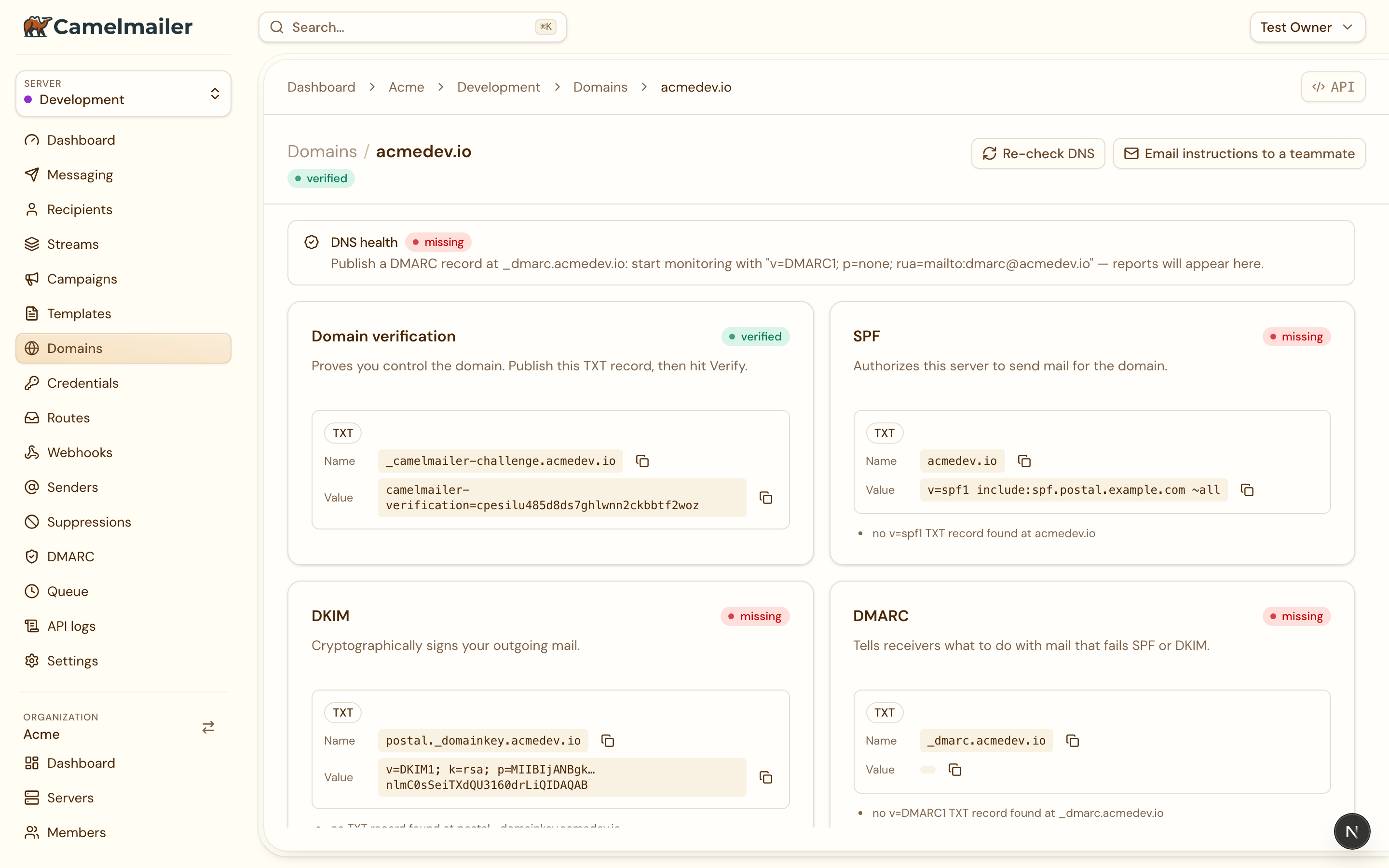
In the dashboard under Server → Domains, opening a domain lands on a single detail view built around the DNS flow. Records and health live together on one page, so you never switch tabs to see whether a record you just published is passing:
- Each record is its own card (Verification, then SPF and DKIM for sending), with the monospace name and value you can copy and a status pill fed by the live health check right on the card. While the check runs, the cards show skeletons rather than empty rows.
- A Re-check DNS action re-runs SPF, DKIM and DMARC, shows a spinner while it works, and confirms with a toast; the pill on each card updates in place and names the exact record still to publish when one is not satisfied yet.
- An email the records action opens a prefilled draft with every record as plain text, for when someone else owns the DNS.
When a domain has no DKIM key at all, the DKIM card is replaced with a notice that outgoing mail will go unsigned.
All admin endpoints live under /api/v2/admin/organizations/{org}/servers/{server} and authenticate with X-Admin-API-Key (machine, full access) or a user session Authorization: Bearer(RBAC-scoped):
| Method | Path | Does |
|---|---|---|
| GET | /domains | List domains, each with its three records |
| POST | /domains | Add a domain (generates the DKIM key and token) |
| GET | /domains/{name} | Show one domain and its records |
| DELETE | /domains/{name} | Remove a domain |
| POST | /domains/{name}/verify | Verify via the DNS challenge (force for the machine key) |
| GET | /domains/{name}/health | Live SPF/DKIM/DMARC health check |
Add and verify a domain
Add the domain:
curl -X POST \
  -H "X-Admin-API-Key: $ADMIN_KEY" \
  -H "Content-Type: application/json" \
  -d '{"name": "acme.com"}' \
  https://mail.example.com/api/v2/admin/organizations/acme/servers/transactional/domains
The response carries the three records to publish at your DNS provider as TXT records:
_camelmailer-challenge.acme.com.  TXT  "camelmailer-verification=Xa9kQ2..."
acme.com.                         TXT  "v=spf1 include:spf.example.com ~all"
camelmailer._domainkey.acme.com.  TXT  "v=DKIM1; k=rsa; p=MIIBIjANBgkqhkiG9w0BAQ..."
Wait for propagation, then run the verify call:
curl -X POST \
  -H "X-Admin-API-Key: $ADMIN_KEY" \
  https://mail.example.com/api/v2/admin/organizations/acme/servers/transactional/domains/acme.com/verify
verified: true and is ready to send. Add a DMARC record next and watch the health turn green: see Deliverability & DNS.